


In 2025 users are confused what they should choose Ulaa vs Brave browser. Since the launch of Ulaa Browser, the browser market has seen significant disruption and new changes. In today’s digital age, web browsers are no longer just a means of accessing the internet, but have become a tool for user privacy, productivity, and security. The web market features established and powerful alternatives like Brave browser, while newer, more powerful options like Ulaa (made by Zoho Corporation) offer a wide range of features.
Both browsers are known for their privacy and security, but which browser should users set as their default? Regular users need a default browser for both personal and professional use. Both browsers are chromium based and both are all time batter than Google Chrome browser.
Brave Browser
Brave is a Chromium-based open-source web browser developed by Brendan Eich, the creator of JavaScript and co-founder of Mozilla. It is renowned for its powerful ad-blocking capabilities and crypto-focused ecosystem (BAT Tokens). For browsing ads, Brave rewards users with points, which they can convert into crypto and earn rewards. Brave’s primary goal is to protect users from ads and trackers, and it keeps track of how many trackers they have blocked. Brave browser’s Shield feature is truly powerful, blocking or even removing hidden trackers and ads.
Ulaa Browser
Ulaa is also a Chromium-based browser developed by Indian tech giant Zoho Corporation. It is a privacy-focused browser. The word “Ulaa” means “journey” or “journey” in Tamil. It is specifically designed for users who want to avoid online trackers, ads, and redirecting links and enjoy surveillance-free browsing. Ulaa’s “Extreme Protection” is powerful and effective, blocking trackers and ads before they even appear on your browsing results in an end-to-end encryption. Two powerful privacy and security options are provided: “Standard” and “Extreme,” further enhancing privacy. Unlike Brave browser, Ulaa doesn’t support any crypto or ad networks, but it offers five unique modes that allow for a separation between work and personal life.
This feature is especially important for users who want to balance their daily routines. Ulaa also features Zoho’s Ecosystem. If users use Zoho Mail, CRM, and Docs, this is a boon for them. They can sync their daily tasks. The advantage is that they don’t have to navigate between different devices with pending work. As soon as they log in to the Zoho synced device, all the tasks will appear, allowing them to pick up where they left off last time.
Privacy and Security
Ulaa’s Approach: ‘Zero Tolerance’
The Indian-made Ulaa browser is very strict and rigorous when it comes to privacy. Its Zero Tolerance Policy means that it doesn’t allow any “backdoors” for ads running on websites, nor can they track user data. Ulaa’s built-in Ulaa Adblocker and Extra Protection block trackers, ads, sensors, third-party cookies, and fingerprint sensors from being read by the system before the website even loads.
- Data Sovereignty: Ulaa takes great care of its users, especially their Zoho Mail data (if sync is on) is stored encrypted on servers in India (specifically in India for Indian users) and in data centers on the respective continents, rather than selling it to advertising companies. Users’ encrypted data cannot be seen or read even by Zoho itself.
- Anonymous ID: This frequently resets the user’s device ID, preventing websites from tracking them over time. This is especially useful when users need to access information from a single website and need to visit it frequently. This automatically resets their unique ID and prevents tracking.
Brave’s Approach: ‘Brave Shields’
- Brave browser uses its Brave Shields by default, which blocks cross-site trackers, cookies, and ads. Brave Shield is a powerful feature that comes built into the browser. Brave Shield blocks all types of tracking, including sensors, ads, and fingerprint tracking. This significantly speeds up the browser and reduces resource usage.
- Tor Integration: The Brave browser has a built-in ‘Tor’ mode, which is considered the best for cybersecurity. It routes users’ traffic through multiple servers, hiding their IP addresses. It’s more powerful and offers greater privacy than Ulaa browser. The only drawback is that the more servers it routes, the slower your internet speed will become. This is suitable if you have high-speed internet. For slower connections, browsing will be fine, but watching videos may be a bit difficult.
- Fingerprinting Protection: Brave browser prevents websites from reading the hardware parameters of your device (such as screen resolution, system configuration, and battery level). This prevents all system data from being leaked and system information from being passed on. It also prevents trackers from knowing what’s on your system and what type of system it is.
Unique Features
Ulaa’s Biggest Strength: 5 Browsing Modes
The most revolutionary feature of the Ulaa browser is its Modes. These aren’t just tab groups, but instead act as separate profiles. Data from other profiles doesn’t mix between these profiles, and using specific modes balances browsing and work.
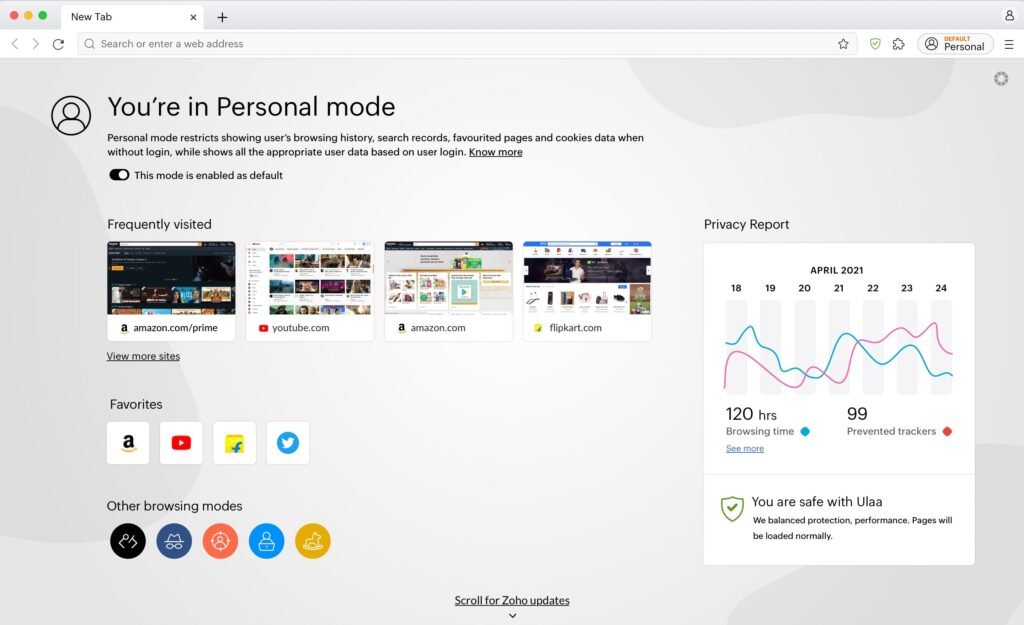
- Personal Mode: Ideal for secure logins and browsing free from tracking, ads, and sensors. Its browsing status, displayed on the home screen, allows users to see how much time they’ve spent on which websites throughout the day in “Screen Sense,” a feature difficult to find in Brave browser. This helps users stay focused on their activity. The second is the “Privacy Report,” which shows how many ads and trackers were blocked during browsing.
- Work Mode: Blocks distracting adult and phishing sites and prioritizes work-related apps to increase productivity. It effectively blocks attackers from accessing users’ business and work-related content.
- Kids Mode: Password-protected, displays only whitelisted content for children. It blocks gambling, adult sites, and paid games. This mode completely filters content to ensure safe browsing for children.
- Developer Mode: Designed for web developers, especially techies, it comes with a JSON viewer and other developer tools. It only displays filtered results that are useful to developers. It blocks unnecessary websites from appearing in any search, preventing distractions, allowing developers to focus solely on their work.
- Open Season Mode: Ulaa’s mode is completely free. It has no restrictions; it’s for sites that don’t stay live for long and are closed due to ad-blockers and cookies. Accessing the site again refreshes it and resets any previous actions. This is best for those who need to stay on the site for a long time, such as government websites. This mode doesn’t have an ad blocker or cookie blocker. However, users can turn on the ad blocker in Settings if they wish.
Brave’s Strengths: Web3 and Rewards
The Brave browser’s biggest strength is its advanced functionality. It operates on Web3, making it more advanced than Ulaa. Being on Web3 makes Brave browser’s advanced features more powerful, and it also earns rewards through browsing to invest in products. However, it doesn’t have multiple modes like Ulaa.
- Brave Rewards: If users view and click ads on Brave browser, Brave rewards users with BAT (Basic Attention Token), which is paid in cryptocurrency. Viewing ads and receiving rewards in cryptocurrency is a great way to do with normal browsing.
- Leo AI: Brave browser has its own AI assistant, ‘Leo,’ which can summarize any page directly in the browser. It’s based on the Llama and Cloud models. This saves users a lot of time and data, allowing them to summarize and read highlights instead of reading the entire article. Additionally, users can chat with Leo AI and ask for answers to questions.
- Brave Talk & News: This is Brave browser’s own video calling feature, allowing for meetings and video calls. Along with meetings, it also offers a chat feature, allowing for chatting during video calls. It can be thought of as a Zoom Meeting or Scape, offering video calling and meetings. It is available in both free and paid versions. The free version allows for up to four simultaneous conversations, while the paid version offers additional features for more. An extension for Brave Talk is also available on the Google Play Store.
- Brave Wallet: Brave Wallet is a cryptocurrency wallet built directly into the Brave Browser. It stores, manages, and exchanges users’ cryptocurrencies. Most importantly, this is a “Browser-Native” wallet, not an extension.
- Extension Wallets (like MetaMask): These are installed as add-ons to Chrome or Firefox. The biggest problem with these is that users often download fake extensions and get tricked, which can lead to the user’s crypto being stolen.
- Brave Wallet (Browser-Native): This is a built-in feature of the browser, just like your bookmarks or password manager. Therefore, it is more secure and best for storing crypto.
Performance and Resource Usage
Speed
Both browsers are based on the Chromium engine, so web rendering speeds are roughly equal. However, users will notice a difference in speed when switching from Brave browser to Ulaa browser directly. As our research found, web loading times were significantly slower immediately after installing Ulaa than with Brave. It was assumed that the faster loading times were due to the recent installation and the absence of bookmarks and history.
After using the Ulaa browser regularly, we discovered that Ulaa is slightly faster because it already blocks trackers, which is reflected in the URLs. Instead of long URLs, short URLs are being used, which blocks trackers from behind. This feature is absent in Brave browser, so after the speed is achieved, it will be in the position behind Ulaa.
- Brave: It saves bandwidth by not loading ads, resulting in much faster page loading. It is 3 times faster than Chrome.
- Ulaa: It is also very lightweight, meaning it uses very few resources and is light weight. Another reason for its speed is that it does not have crypto miners or wallet services running in the background. It uses less RAM than Brave and gives better results on older PCs. Its feature of blocking trackers before loading makes it faster.
Resource Management
- Ulaa: It’s very “lightweight,” offering good performance with very little RAM. It’s considered best for older computer systems. It comes without unnecessary plugins, putting less pressure on system resources.
- Brave: It’s quite fast, but its crypto wallet and rewards system can sometimes use additional resources in the background, causing it to lag a bit. However, this can be turned off in the settings.
Detailed Comparison Table
| Category | Feature | 🟠 Ulaa Browser | 🦁 Brave Browser | 🏆 Winner |
|---|---|---|---|---|
| 1. Core Foundation | Engine | Chromium | Chromium | 🟰 Tie |
| Developer | Zoho Corporation (India 🇮🇳) | Brave Software Inc. (USA 🇺🇸) | 🟰 Tie | |
| Launch Year | 2023 (Newer) | 2016 (Established) | 🦁 Brave (Battle-tested) | |
| Open Source | Partially Open | ✅ Fully Open Source | 🦁 Brave (Full transparency) | |
| Revenue Model | SaaS subsidized (No ads needed) | Ad network + Premium subscriptions | 🟠 Ulaa (No ad incentive) | |
| 2. Privacy Protection | Ad Policy | 🎯Zero Tolerance(All ads blocked) | Blocks 3rd party ads, shows own Brave Ads | 🟠 Ulaa (Purist policy) |
| Tracker Blocking | Standard filter lists | ✅CNAME Uncloaking(Advanced) | 🦁 Brave (Technically superior) | |
| Fingerprinting Protection | Standard protection | ✅Randomizationtechnology | 🦁 Brave (Advanced defense) | |
| Dynamic ID Switching | ✅Yes(Resets every session) | No (Static ID) | 🟠 Ulaa (Unique feature) | |
| Tor Integration | ❌ No (Needs VPN extension) | ✅Built-in(Private Window) | 🦁 Brave (Instant anonymity) | |
| Data Sovereignty | ✅Local servers(India for Indian users) | US-based servers | 🟠 Ulaa (For Indian users) | |
| Privacy Philosophy | 🎯 “Don’t collect data at all” | 🛡️ “Filter and protect data” | 🟠 Ulaa (Zero collection) | |
| 3. Ad & Tracker Blocking | Ad Blocker Engine | Standard (EasyList based) | ✅Rust-based engine(Fastest) | 🦁 Brave (Superior tech) |
| YouTube Ad Blocking | Often blocks | Often blocks | 🟰 Tie | |
| Script Blocking | Standard | ✅ Aggressive mode available | 🦁 Brave | |
| Malware Protection | ✅ Yes | ✅ Yes | 🟰 Tie | |
| Cookie Blocking | ✅ 3rd party blocked by default | ✅ 3rd party blocked by default | 🟰 Tie | |
| 4. Unique Features | Browsing Modes | ✅5 Modes(Personal, Work, Kids, Developer, Open Season) | ❌ No (Only profile switching) | 🟠 Ulaa (Revolutionary) |
| Kids Mode | ✅Password protected+ Content filter | ❌ No (Needs extensions) | 🟠 Ulaa (Family-friendly) | |
| Work Mode | ✅Distraction blocker+ Productivity focus | ❌ No | 🟠 Ulaa | |
| Developer Mode | ✅Built-in JSON viewer+ Dev tools | Standard Chrome DevTools | 🟠 Ulaa (For developers) | |
| Web3 / Crypto Support | ❌ No (Completely crypto-free) | ✅Brave Wallet+BAT Rewards | 🦁 Brave (For crypto users) | |
| Crypto Wallet | ❌ None | ✅Multi-chain wallet(BTC, ETH, SOL, ZEC) | 🦁 Brave | |
| Earn While Browsing | ❌ No | ✅BAT Token rewards | 🦁 Brave | |
| 5. AI Assistant | Built-in AI | ✅Zia AI(Zoho ecosystem) | ✅Leo AI(Llama/Claude based) | 🟰 Tie (Different purposes) |
| Page Summarization | ✅ Yes | ✅ Yes | 🟰 Tie | |
| AI Chat | ✅ Yes | ✅ Yes | 🟰 Tie | |
| 6. Performance | RAM Usage | ✅Very Low(Lightweight) | Low-Medium (Crypto features add overhead) | 🟠 Ulaa |
| CPU Usage | ✅Low | Medium | 🟠 Ulaa | |
| Page Loading Speed | ✅ Fast (No ads to load) | ✅ Fast (No ads to load) | 🟰 Tie | |
| Battery Consumption | ✅Low(Mobile optimized) | Low | 🟠 Ulaa (Mobile users) | |
| Startup Time | ✅ Fast | Fast | 🟰 Tie | |
| 7. Sync & Ecosystem | Sync Method | ✅Zoho Account (Email/Password) & Sync Chain | Sync Chain(No account needed) | 🟠 Ulaa |
| Bookmark Sync | ✅ Yes (Encrypted) | ✅ Yes (Encrypted) | 🟰 Tie | |
| History Sync | ✅ Yes | ✅ Yes | 🟰 Tie | |
| Cross-device Sync | ✅ Yes (Modes stay separate) | ✅ Yes | 🟰 Tie | |
| Zoho Integration | ✅Deep integration(Notebook, Mail, CRM) | ❌ None | 🟠 Ulaa (Zoho users) | |
| 8. Platform Support | Windows | ✅ Yes | ✅ Yes | 🟰 Tie |
| macOS | ✅ Yes | ✅ Yes | 🟰 Tie | |
| Linux | ✅ Yes | ✅ Yes | 🟰 Tie | |
| Android | ✅ Yes | ✅ Yes | 🟰 Tie | |
| iOS | ✅ Yes | ✅ Yes | 🟰 Tie | |
| Indus | ✅ Yes | ❌ No | 🟠 Ulaa | |
| 9. Customization | Themes | Limited options | ✅ Extensive options | 🦁 Brave |
| Extension Support | ✅ Chrome Web Store | ✅ Chrome Web Store | 🟰 Tie | |
| New Tab Customization | Basic | ✅ Advanced (Widgets, Stats) | 🦁 Brave | |
| 10. Security | HTTPS Upgrade | ✅ Automatic | ✅ Automatic | 🟰 Tie |
| Phishing Protection | ✅ Yes | ✅ Yes | 🟰 Tie | |
| Hardware Wallet Support | ❌ No | ✅Ledger, Trezor | 🦁 Brave (Crypto security) | |
| Security Audits | Limited (Newer company) | ✅ Regular audits | 🦁 Brave (More tested) | |
| Bug Bounty Program | ✅ Yes | ✅ Yes | 🟰 Tie | |
| 11. Premium Services | Built-in VPN | ❌ No | ✅Brave VPN + Firewall(Paid) | 🦁 Brave |
| Premium AI | ❌ No | ✅Leo Premium | 🦁 Brave | |
| Price | 100% Free | Free + Paid options | 🟠 Ulaa (No upselling) | |
| 12. Enterprise Features | Policy Management | ✅Ulaa Enterprise(Centralized control) | Limited | 🟠 Ulaa |
| DLP (Data Loss Prevention) | ✅Built-in | ❌ No | 🟠 Ulaa | |
| Admin Controls | ✅ Comprehensive | Basic | 🟠 Ulaa (Corporate use) | |
| 13. Target Audience | Privacy Purists | ✅Ideal(Zero ads philosophy) | Good (But has ad system) | 🟠 Ulaa |
| Crypto Enthusiasts | ❌ Not suitable | ✅Perfect(Wallet + DeFi + NFT) | 🦁 Brave | |
| Families with Kids | ✅Ideal(Kids Mode) | Needs setup | 🟠 Ulaa | |
| Developers | ✅Ideal(Developer Mode) | Good | 🟠 Ulaa | |
| Corporate/Enterprise | ✅Ideal(Enterprise features) | Limited | 🟠 Ulaa | |
| General Users | ✅ Great | ✅ Great | 🟰 Tie |
User Interface and Customization
- Ulaa: Its interface is clean and there are no unnecessary extensions. Switching between modes is very easy, with modes available right on the home screen. It integrates well with other Zoho apps (such as Zoho Notebook, Writer).
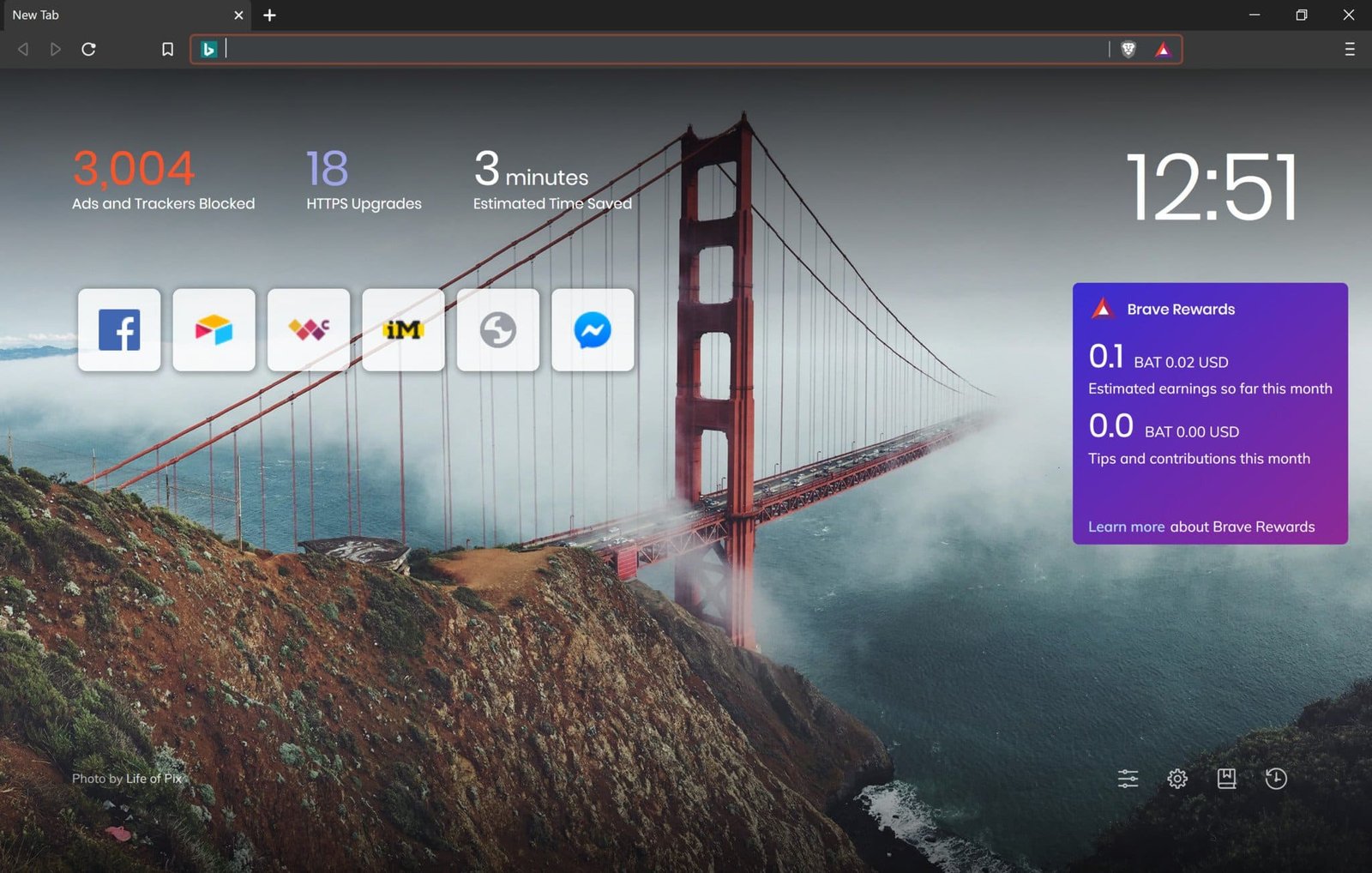
- Brave: Its look is similar to Chrome, but it displays a ‘Shields’ icon in the address bar and ‘Trackers Blocked’ reports on the New Tab page. Digital professionals interested in crypto may find Brave’s UI a bit bloated.
Sync and Ecosystem
- Ulaa: It syncs data using its parent company, Zoho Account. If users are already using Zoho services, it works seamlessly. User data is end-to-end encrypted.
- Brave: This doesn’t use a traditional “login” system because Brave browser doesn’t have its own echo system. Instead, it uses Sync Chain (a QR code or code phrase) to sync users with Brave. Privacy is better because there’s no email ID link, but connecting new devices can sometimes be a bit of a headache.
Which should you choose?
In today’s world, where stealing and selling user data has become a business, it’s crucial to carefully choose a good browser that protects user data, neither selling it to other companies nor keeping it for oneself. The final verdict here is based on the winner score to determine which browser will best suit which users. Each user has their own preferences and choices, which GDZ respects.
📊 Winners Scorecard
| Browser | Total Wins | Best For |
|---|---|---|
| 🟠Ulaa | 16 wins | Privacy purists, Worldwide & Indian users, Families, Developers, Enterprise, Low-spec PCs |
| 🦁Brave | 14 wins | Crypto users, Web3 enthusiasts, Power users, Those needing Tor, Premium features |
| 🟰Tie | 18 categories | Both equally capable in core browsing functions |
Choose Ulaa Browser if
- You’re part of the Zoho ecosystem or want an Indian server-hosted secure browser.
- You desperately need separate profiles for work/life balance.
- You want to avoid the complexity of crypto and token systems.
- You’re a web developer and want built-in dev tools without installing extensions.
Choose Brave Browser if
- You’re interested in Web3 and cryptocurrency.
- You need advanced privacy features like Tor.