


India’s first fully indigenous browser is Ulaa Browser, is a privacy-first and non-tracking browser. It is the first browser in the global market that does not track or store user data in any way. Its privacy-first option blocks tracking, protecting users from data theft. Ulaa was designed with users and working professionals in mind, with a toggle switch for each feature.
- What is Ulaa Browser?
- Key Features: Why Ulaa Stands Out
- Game Changer: Ulaa’s 5 Browsing Modes Explained
- Personal Mode (Default)
- Work Mode (Productivity Powerhouse)
- Kids Mode (Parental Controls Built-in)
- Developer Mode (For Techies)
- Open Season Mode (No Blocking)
- Should You Download Ulaa in 2025?
- Is It Time To Ditch Chrome & Brave?
- FAQ
What is Ulaa Browser?
The Ulaa Browser, developed by Zoho Corporation, is a fully Indian browser headquartered in Chennai, India. Its primary goal is to create a privacy-focused browser that provides privacy and security from the back end. At a time when “online privacy” often seems like a pipe dream, a new browser has emerged that is challenging the major browser companies. This is a Chromium-based browser that Zoho Corporation has modified to make it even better.
Why did Zoho choose and retain the name “Ulaa”? Because Ulaa is a Tamil word meaning “journey” or “travel,” which also refers to the journey of the Internet, and reflects its goal of secure web exploration. Zoho’s Ulaa Browser has won a landslide victory in the Indian Web Browser Development Challenge (IWBDC). But does Ulaa Browser really have the potential to replace Google Chrome as users’ everyday browser? Ulaa would need to be a step ahead in terms of speed and features, similar to Chrome.
Ulaa’s key promise is simple: Ulaa users are not a product whose data is sold on the market. It blocks tracking by default, doesn’t sell your data, and ensures your browsing history stays on your device, untraceable.
Key Features: Why Ulaa Stands Out
Ulaa isn’t just a “private window” that pretends to be a browser. Its entire architecture is unique and specifically designed.
Privacy-First Architecture
Most browsers on the market use additional extensions to block ads and trackers, but Ulaa’s core code includes these protections.
- Ad and Tracker Blocker: It automatically blocks and removes malicious ads and invisible trackers that intrude behind the scenes. These malicious trackers are those that redirect websites to other websites that may contain viruses.
- Anonymized IDs: Ulaa frequently resets your unique application ID, making it nearly impossible for data brokers to build a long-term profile of your habits. This has the advantage that no broker will be able to track a user with a unique ID for a long time, and the anonymized ID will automatically change within a short period of time. This prevents brokers from stealing data if a unique ID is not present.
- End-to-end encryption: Ulaa allows syncing across all devices (mobile/desktop) linked to Zoho Mail. Zoho Mail and Ulaa encrypt user data before it leaves the device. Even Zoho cannot read the user’s synced passwords or bookmarks. This provides the advantage of end-to-end encryption. This feature is enough to give a huge blow to Google, as Google has and stores data on every user.
Multi-Device Support
Ulaa Browser is currently available on all major operating platforms.
- Windows
- macOS
- iOS (iPhone/iPad)
- Android
- Linux
- Indus
Support for multiple devices makes it a highly usable browser, allowing users to use it on every platform accordingly.
Extremely Fast Performance
By blocking resource-hungry ads and tracking scripts before they load, Ulaa significantly reduces page loading times and data consumption. This prevents unnecessary bloatware, ads, and trackers from loading, making browsing faster. This is a major plus for users with limited mobile data plans, saving them a significant amount of data.
Game Changer: Ulaa’s 5 Browsing Modes Explained
This is the “killer mode” of the Ulaa browser. Most browsers, like Chrome, Brave, and Vivaldi, offer “profile” features (e.g., Persona 1, Persona 2). This extra feature allows you to open the browser in a new tab in a new window, allowing you to start tasks fresh and log in with a new email. But Ulaa takes this a step further with separate profiles called Modes. Each mode acts as a completely separate browser, ensuring that work data never mixes with personal searches and allows you to manage other profiles, including separate personal and work profiles.
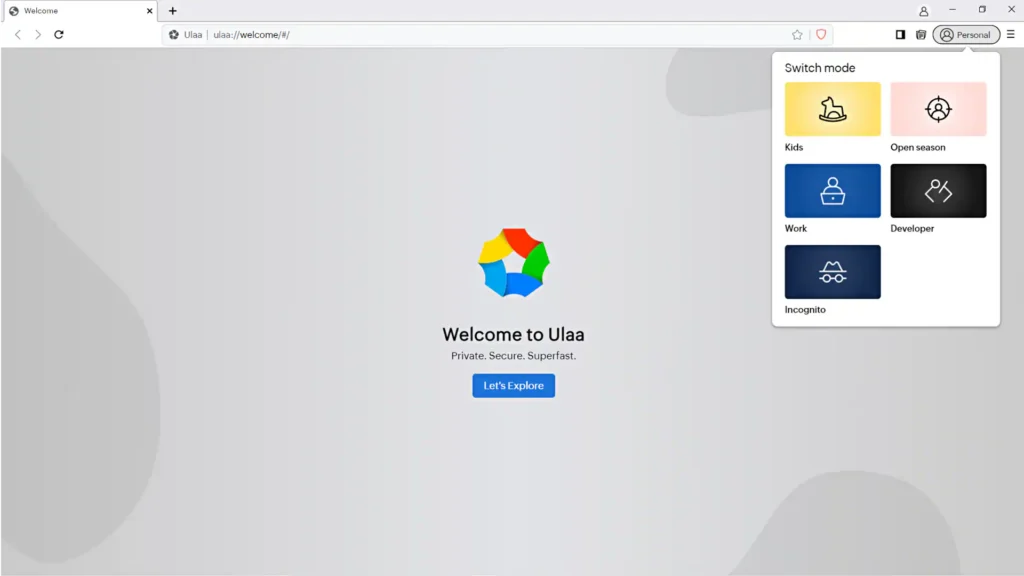
Here are some of the profiles:
Personal Mode (Default)
This is the user’s everyday browsing profile driver. This allows the user to browse freely and freely. It quickly blocks ads and maintains complete privacy, which is great for banking, shopping, and social media.
- Best For: Online banking, reading news, and social media.
Work Mode (Productivity Powerhouse)
This mode is designed to keep users focused. It automatically groups tabs to reduce clutter and includes protection against phishing attacks that often target businesses.
- Best For: SaaS tools, email, research, and professional dashboards.
Kids Mode (Parental Controls Built-in)
This mode is a godsend for parents. This password-protected mode creates a safe “sandbox” for children, allowing them to protect them from inappropriate activities that may negatively impact their minds. It offers key features like content filters, user interface, and learning.
- Content Filtering: Automatically blocks adult content and gambling sites.
- Interface: Simplifies the UI to prevent accidental settings changes.
- Learning Focus: Whitelists educational domains while blocking distracting games.
Developer Mode (For Techies)
A haven for web developers, this is a paradise. It comes preloaded with advanced developer tools and suggestions. Most importantly, it keeps the user’s testing environment separate from your personal cache/cookies.
- Best For: HTML/CSS debugging, API testing, website audits.
Open Season Mode (No Blocking)
Users sometimes mess up privacy protection by leaving cookies and caches from old websites. “Open Season” disables all blockers and tracking protection. It’s like the “Wild West” of browsers. This comes in handy when a site won’t open or refuses to load without tracking scripts. Some websites allow ads and trackers to generate revenue. This is similar to AdSense, which provides them with money, and in some cases, it’s also promotional. Therefore, such websites forcefully load ads and trackers.
- Best For: Older government sites or testing how a site looks to a standard user.
Should You Download Ulaa in 2025?
The web browser will always be king in the internet world because it’s the web browser that transmits all of a user’s data to the internet. Simply put, a user needs a browser for any website, game, research, or personal search. The browser tracks every search and its movements, as if it possesses the user’s entire horoscope. Because the browser has access to everything—passwords, banking details, office work, working data, and social profiles—misusing them is a no-brainer.
This is why Ulaa Browser doesn’t fall into the category of such browsers. Ulaa’s biggest competitors are Google Chrome, Brave, DuckDuckGo, Firefox, and Vivaldi, all of which are facing stiff competition. Brave used to be the top choice for the best privacy-based browser in the browser market, but perhaps the market is changing and people are turning to Ulaa. Because only Ulaa offers the most privacy today. Recently, Perplexity AI’s browser Comet also launched, which we’ve discussed in detail. Comet browser currently has several shortcomings, which is why we don’t recommend using it as your primary browser. Nor do we recommend logging in with your primary email.
Ulaa offers a new and reliable alternative without compromising on features.
Pros:
✅ Best-in-class privacy protection.
✅ New “modes” for work/life balance.
✅ Faster than Chrome on older hardware.
✅ Supports Chrome extensions.
✅ No user data collection for ads.
✅ Blocks ads & trackers natively without extensions.
✅ Uses significantly less RAM than Chrome & Brave.
✅ Dedicated workspaces for Kids, Developers, and Work.
✅ Built-in Kids mode saves you from buying separate software.
✅ Perfect for users already using Zoho apps & Zoho eco-system.
Cons:
❌ “Open Season” mode can be risky if used carelessly.
❌ Brand recognition is still developing compared to Chrome.
❌Brand New: Smaller community means fewer tutorials or user forums compared to Chrome.
Is It Time To Ditch Chrome & Brave?
For over a decade, we’ve been in a “Data Theft Fear” with our browsers. We sell our personal data—our search history, shopping habits, and even our location—for the convenience of free browsing. Ulaa Browser completely changes this dynamic. By removing the tracking mechanisms that slow down today’s web browsers, Ulaa proves that you don’t have to compromise performance for privacy. In fact, for many users, privacy is a performance upgrade.
For Privacy-Conscious Users: Ulaa is proving to be a great option. The built-in ad blocker and “zero-tracking” policy are winning users’ trust, assuring them that all their data is 100% secure, a feature Chrome can never match.
For Parents: The “Kids Mode” alone makes Ulaa worth downloading. Because it eliminates the need for other expensive parental control software, offering a free, built-in solution.
For Productivity Enthusiasts: “Work Mode” and “Developer Mode” are truly useful tools that help separate your 9-to-5 from your 5-to-9.
Ulaa isn’t just an alternative to Chrome or Brave, it’s an upgrade to Chrome. It features the same search engine that powers the web, but removes surveillance cameras, meaning ads and trackers. The browser itself doesn’t store your data, so it’s hard to find a better alternative.
FAQ
Is Ulaa Browser safe to use for online banking?
Yes, Ulaa is highly secure for financial transactions. In Personal Mode, it employs strict encryption and anti-phishing protocols that verify website authenticity before you enter any passwords. Its “Zero Tracking” policy also ensures that no third-party scripts are secretly logging your keystrokes or financial data.
Is Ulaa browser Chinese?
No. Ulaa is proudly Made in India. It is developed by Zoho Corporation, a highly respected global technology company headquartered in Chennai, India. Unlike some browsers with hidden ownership, Zoho is transparent about its business model, which relies on software sales, not data selling.
Does Ulaa support Chrome Extensions?
Absolutely. Since Ulaa is built on the Chromium engine (the same technology behind Chrome, Edge & Brave), you can access the Chrome Web Store and install almost any extension you already use, such as Grammarly, LastPass, or Honey.
Is Ulaa faster than Google Chrome?
In most daily use cases, Yes. Because Ulaa blocks ads and tracking scripts before they load, websites often display faster and use less data. While Chrome may have a slight edge in running complex Google Web Apps (like Google Earth), Ulaa feels snappier for general browsing, news reading, and social media.
How does Ulaa make money if it doesn’t sell ads?
This is the most important question. Ulaa is funded by Zoho’s ecosystem. Zoho makes billions selling business software (CRM, Mail, Books) to companies. They view the browser as a tool to complete their privacy-first ecosystem, not as a standalone product to harvest data. You are the customer, not the product.
Can I sync my passwords from mobile to desktop?
Yes. You can create a Zoho account (which is free) to sync your bookmarks, passwords, and open tabs across all your devices—Windows, Mac, Linux, iPhone, and Android. Importantly, this data is end-to-end encrypted, meaning even Zoho employees cannot read your passwords.
What happens in “Kids Mode”?
Kids Mode creates a safe, walled garden for children. It automatically blocks millions of adult websites, gambling portals, and violent content. It uses a password-protected “Child Lock” so your child cannot exit the mode or change settings without your permission.